npm Supply Chain Attack: What Happened In September 2025 And How To Check Your Project
Two npm attacks hit JavaScript developers in September 2025. See what happened, which packages were involved and how to check your own project.

IN THIS POST
In September 2025, attackers slipped bad code into some of the most downloaded packages on npm. Here is what happened, in plain English, and what to do about it today.
If your app was built with Lovable, Bolt, Cursor or any other JavaScript tool, it depends on npm packages. Probably hundreds of them, and you chose almost none yourself. In September 2025 that quiet trust was tested twice in about a week.
What Happened In September 2025
The first incident came on 8 September. Attackers sent a well-known npm maintainer a fake support email from a lookalike domain, with a bogus request to reset two-factor authentication. Once they had the account, they published poisoned versions of around 18 popular packages, including chalk, debug and ansi-styles. The injected code was a crypto stealer that quietly swapped wallet addresses in the browser. The bad versions were downloaded more than 2.5 million times, though researchers traced only about $500 in stolen funds, partly because the obfuscated code was spotted quickly.
The second incident came on 16 September, and it was a different animal. A self-replicating worm called Shai-Hulud spread through npm using tokens left over from an earlier breach. It used GitHub Actions workflows to steal secrets from the repositories it reached, and it flipped some private repositories to public. Datadog's researchers put the total across the month's incidents at more than 500 compromised packages.
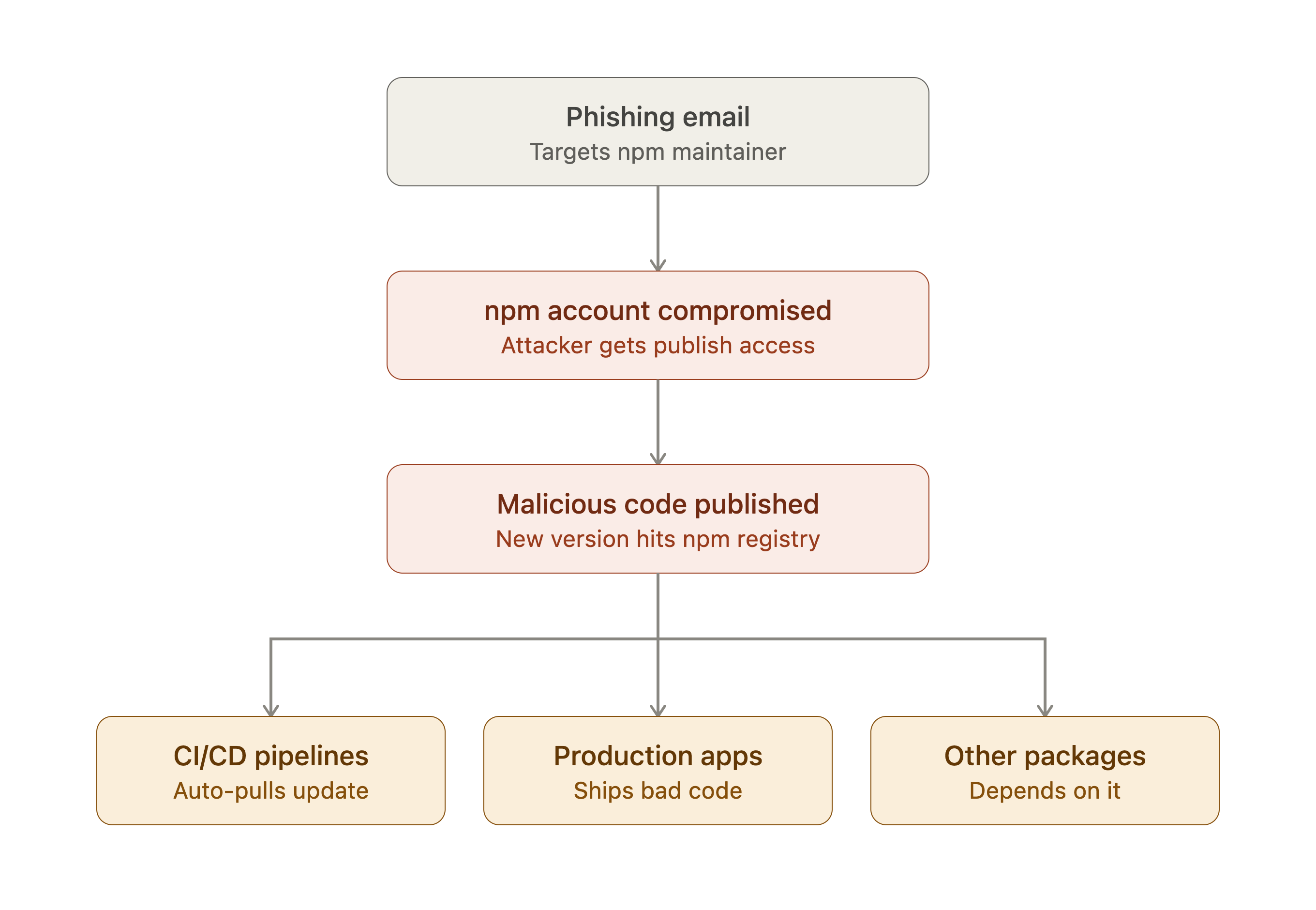
Caption: How the attack spread, from one phished maintainer account to dozens of poisoned packages.
Your app is only as trustworthy as the least careful maintainer it depends on.
Packages Named In The Attack
These are some of the packages from the 8 September incident. If one of them sits in your project, it is worth a look.
Why This Matters For AI-Built Apps
AI coding tools install packages quickly and rarely stop to explain them. That is handy until one of those packages turns out to be a dependency vulnerability waiting for the next install. You do not need to audit every line of every package. You do need to know which ones you have and to notice when one changes under you.
What Should You Do Today?
- Review your dependencies. Look for packages updated recently that you did not expect.
- Replace exposed secrets. Any token or key that sat on an affected machine should be revoked and regenerated.
- Turn on two-factor authentication for your npm and GitHub accounts. A phishing email is much less dangerous when the account needs a second proof, and a two-factor app or security key is better than a text message.
- Pin your versions. A lock file stops a new bad release from sliding in on the next install.
Check Your Lock File
Run this in your project to see which versions of the affected packages you have installed. Compare the result with the versions listed in the advisories in the references below.
npm ls chalk debug ansi-styles
If a compromised version shows up, follow these steps in order:
- Delete node_modules and your lock file.
- Pin the package to a safe version in package.json.
- Run npm install again and commit the new lock file.
- Rotate every token and key that was available on that machine.
If you would rather have a tool do the first pass, the GitHub connection lets a full check read your package list with read-only access, and the guide to running your first scan shows how.
Supply chain attacks feel abstract until one reaches your own build. The checks above take minutes, and doing them once puts you ahead of most teams. Keep an eye on what changes in your dependencies, and the next headline will be someone else's problem.
References
Does your app have any of these problems?
Paste your website for a free quick check. About a minute, and nothing on your site is changed.